







LeoPDFree for Windows
- Free
- 4.81
- V1.0.0
Free Download for Windows
View an ad to download for free
Free Offline PDF Converter
LeoPDFree - Free, Lightweight & Secure Offline PDF Converter
Product Overview
LeoPDFree is a 100% free, lightweight, and local-first desktop utility designed to handle your daily PDF document conversions with ultimate privacy. Unlike online converters that require uploading sensitive files to the cloud, LeoPDFree processes all documents directly on your local computer. It solves the critical problem of data privacy risks while delivering lightning-fast, high-quality document conversion without any subscription fees or hidden costs.
Main Features
Key Capabilities & Highlights
100% Offline & Private Processing: Your files never leave your computer. Complete local conversion ensures your confidential PDFs, financial records, and private data remain absolutely secure.
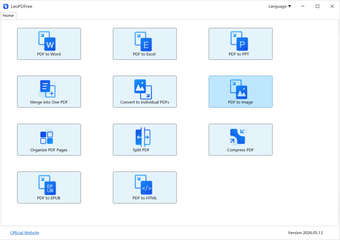
Versatile PDF Conversion: Effortlessly convert PDF documents to editable Microsoft Word (.docx), Excel (.xlsx), and high-quality JPG image formats while perfectly preserving the original layout, fonts, and formatting.
Ultra-Lightweight & Clean: Built with efficiency in mind, the installation package is compact, consumes minimal CPU/RAM, and runs smoothly on almost any desktop environment.
Completely Free with No Limitations: No watermarks, no file size limits, and no hidden paywalls. Enjoy full access to all conversion features from day one.
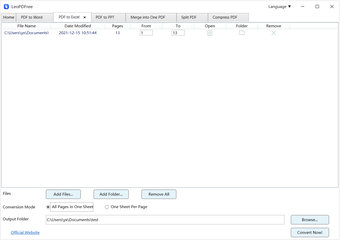
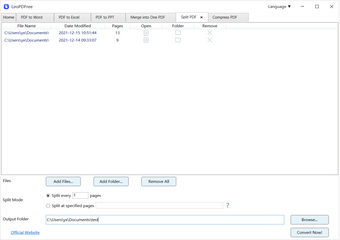
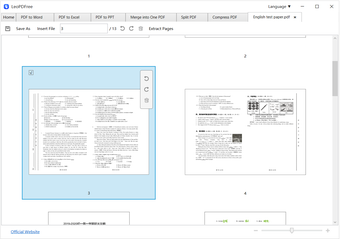
Intuitive Main Interface: A clean, user-friendly UI designed for efficiency. No complex learning curve—just drag, drop, and convert with a single click.
How It Works
Getting your documents converted with LeoPDFree is incredibly simple and takes only three steps:
Launch the Application: Open LeoPDFree to access the clean and straightforward main interface.
Import Your Files: Drag and drop your PDF files into the tool, or click to browse and select files from your local drive.
Convert Instantly: Choose your desired output format (Word, Excel, or JPG) and click "Convert." Your new document will be saved locally in seconds.
What's New in This Version
Optimized the core conversion engine for faster PDF to Word/Excel rendering.
Enhanced formatting and layout preservation for tables and multi-column PDF files.
Fixed minor UI bugs and improved application stability on modern desktop operating systems.
Streamlined the installer package for a faster and cleaner setup experience.
System Requirements & Limitations
System Requirements
Operating System: Compatible with Windows 10 / Windows 11 (64-bit) or macOS 11.0 and above.
Processor: Intel/AMD or Apple Silicon (M1/M2/M3) processor.
Memory: 2 GB RAM minimum.
Storage: Less than 50 MB of free disk space required.
Free vs. Premium Limitations
100% Free Version: LeoPDFree is a fully functional freeware utility. There is no premium tier, no subscription, and no locked features. Every user gets unlimited local conversions, full speed, and zero watermarks for free.
Loading…

App specs
License
Free
Version
1.0.0
Latest update
Platform
Windows
OS
Windows 10
Language
English
Available languages
- Spanish
- English
- French
- German
- Italian
- Portuguese
- Russian
- Chinese
- Turkish
- Arabic
- Korean
- Japanese
- Swedish
- Czech
- Greek
Size
159.34 MB
Developer
- FOUNTAIN CLOUD TECHNOLOGY LIMITED
Program available in other languages
LeoPDFree for PC
- Free
- 4.81
- V1.0.0
Free Download for PC
View an ad to download for free
User reviews about LeoPDFree
Have you tried LeoPDFree? Be the first to leave your opinion!
Add reviewTop downloads File Compression for Windows
Top downloads File Compression for Windows
Top downloads File Compression for Windows
Related topics about LeoPDFree
Latest articles

How to create a macOS Golden Gate USB installer

The Sekiro anime gets a new trailer and all the details about its premiere
Split tunneling is now the most useful VPN feature: more control, fewer slowdowns

That Summer Job Offer Might Be a Scam

Pokémon Legends 3 leak resurfaces: medieval Galar, 1,000 years before Sword and Shield
Laws concerning the use of this software vary from country to country. We do not encourage or condone the use of this program if it is in violation of these laws. Softonic may receive a referral fee if you click or buy any of the products featured here.